Mastering the Art of the 3D Folded Paper Star: A Comprehensive Guide to Your 6-Point SVG Design
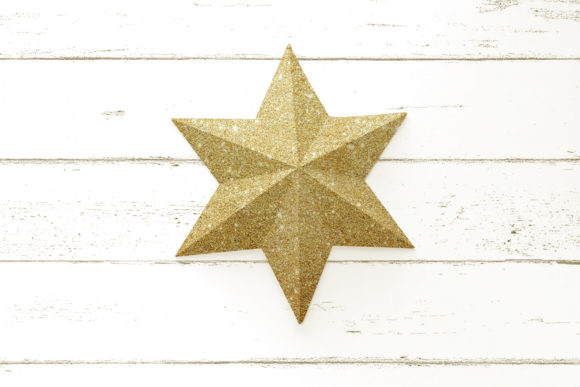
In the world of digital crafting, few projects offer the perfect blend of simplicity and visual impact quite like the 3D folded paper star. This geometric marvel is not merely a decoration; it is a testament to the power of vector design and manual assembly. Whether you are a seasoned pro with a Cricut Explore or Silhouette machine, or a hobbyist who prefers cutting by hand, this 6-pointed star SVG offers a versatile canvas for creativity. As versatile as it is beautiful, this design transforms flat sheets of paper into three-dimensional objects that bring warmth, charm, and a touch of magic to any space.
This article serves as your complete guide to understanding, utilizing, and mastering this instant download product. We will explore its applications, technical specifications, assembly nuances, and how it fits into modern creative workflows. By the end of this read, you will be fully equipped to create stunning paper crafts that elevate your home decor, holiday celebrations, or children’s room aesthetics.
The Versatility of the 6-Pointed Star in Modern Decor
Why choose a 6-pointed star? Unlike the traditional 5-pointed star, the hexagonal symmetry of a 6-pointed star offers a more intricate, snowflake-like appearance that feels both festive and elegant. Its geometric precision allows for complex folding patterns that result in a sturdy, self-supporting 3D structure. But its appeal extends far beyond seasonal holidays.
Seasonal and Everyday Applications
While many immediately associate stars with Christmas, their utility is year-round. Here is how this design can transform various environments:
- Holiday Decorations: Create hanging ornaments, garlands, or table centerpieces. The 3D nature of the star catches light beautifully, creating dynamic shadows and highlights on your tree or mantel.
- Children’s Room Accents: These stars are lightweight and safe (when made from standard paper) to hang above cribs or beds. They add a whimsical, dreamy atmosphere without taking up floor space. Parents love them because they are easy to replace if damaged.
- Home Office and Living Spaces: For a minimalist or Scandinavian-inspired aesthetic, use neutral tones like white, beige, or grey cardstock. A large 3D star on a wall acts as sophisticated art, breaking up empty space with texture and depth.
- Event Styling: Weddings, baby showers, and birthday parties often feature star motifs. This design provides a customizable element that matches any color scheme, from pastel pinks to bold metallics.
The beauty of this design lies in its adaptability. You can choose to make it with or without a back panel, or even put two stars together to create a double-sided effect. This flexibility allows you to tailor the final look to your specific needs, whether you want a solid, opaque object or a delicate, see-through lantern.
Technical Specifications and File Formats
One of the most significant advantages of purchasing an SVG-based design is the range of file formats included. This ensures compatibility across various devices and software platforms, making the product accessible to a wide audience. When you download this package, you receive four distinct file types, each serving a specific purpose in the crafting workflow.
Understanding Your Files
- SVG (Scalable Vector Graphics): This is the primary file for users with cutting machines. It is fully editable and designed specifically for use with Cricut Design Space, Silhouette Studio, Brother ScanNCut, and other popular plotters. The vector format ensures that lines remain crisp regardless of how much you resize the design.
- PNG (Portable Network Graphics): This is a non-cuttable image file provided for reference purposes. It is useful for visualizing the final print colors or for using in graphic design software where vector editing is not required. Note that colors cannot be changed in the same way as vector layers.
- DXF (Drawing Exchange Format): This format is widely supported by various other machines and software, such as Graphtec cutters and AutoCAD. If you are working in a professional engineering or architectural context, or simply have a cutter that does not support SVG natively, DXF is your go-to format.
- EPS (Encapsulated PostScript): Ideal for use with advanced vector editing software like Adobe Illustrator or CorelDRAW. This format preserves all vector data, allowing for high-level customization before sending the file to a cutter.
Note: For those without cutting machines, the PNG and DXF files can still be used. You can open these in free software such as Inkscape or Photopea (a free online alternative to Photoshop), edit the design to your liking, and print it out to cut by hand. This makes the product inclusive for crafters at every skill level.
Assembly and Customization Tips
Once you have your files ready, the next step is assembly. While the design includes clear instructions, understanding the underlying logic of the folds can help you troubleshoot issues and achieve a professional finish.
Preparation and Scaling
Before you begin cutting, it is crucial to prepare your workspace. Use your cutting machine’s software to resize the cutting template as needed. However, a common mistake beginners make is failing to scale proportionally. Make sure to scale all elements uniformly to maintain the geometric integrity of the star. If one point is larger than the others, the star will not fold correctly.
Material Selection
The choice of paper affects the final outcome significantly:
- Cardstock: Recommended for durability. Heavier cardstock (65lb to 80lb) holds its shape better and creates a sturdier 3D form.
- Standard Printer Paper: Good for practice runs or lightweight decorations. Be aware that these may require more careful handling to prevent tearing.
- Specialty Papers: Metallic, glitter, or patterned papers can add unique textures. Just ensure your cutting machine’s blade is sharp enough to handle thicker or coated materials.
The Folding Process
The 3D effect is achieved through precise scoring and folding. Instead of just cutting the outline, you must score the fold lines lightly before bending the paper. This creates clean, sharp creases. If you are making a double-sided star, you will need to assemble two separate units and join them along their edges. This requires patience but results in a stunning, symmetrical object that looks impressive from all angles.
Bridging Technology and Tradition
The intersection of digital technology and traditional paper crafts is where innovation thrives. Products like this 3D folded paper star demonstrate how vector graphics simplify complex geometry. What once required advanced drafting skills can now be achieved with a simple click of a button on a cutting machine.
For educators, this project is an excellent tool for teaching geometry, symmetry, and spatial reasoning. Students can visualize how 2D shapes transform into 3D objects. For businesses, these stars can be part of branded merchandise or event decorations, offering a personalized touch that mass-produced items lack.
Video Tutorials and Community Support
While written instructions are helpful, visual learners may benefit from seeing the process in action. If you would like to see a tutorial video of how to assemble this product, please visit the Designed by Geeks YouTube channel. Video tutorials can clarify subtle techniques, such as how to apply glue without mess or how to align points perfectly.
Common Misconceptions and FAQs
Is this suitable for beginners?
Yes. While the concept of 3D folding might seem daunting, the step-by-step instructions and intuitive design make it accessible to anyone with basic crafting skills.
Do I need expensive equipment?
No. While cutting machines produce faster and more precise results, you can absolutely cut this design by hand using scissors and a free software editor like Inkscape.
Can I change the size?
Absolutely. Because the source files are vectors (SVG, DXF, EPS), you can scale them up or down infinitely without losing quality. Just remember to adjust your cutting settings accordingly for different paper thicknesses.
Conclusion
The 3D folded paper star with 6 points is more than just a craft project; it is a bridge between digital precision and handmade charm. With its multiple file formats, versatile applications, and straightforward assembly, it offers something for everyone. Whether you are decorating for Christmas, adding flair to a child’s room, or exploring the capabilities of your Cricut or Silhouette machine, this design provides a rewarding experience.
By leveraging the power of SVG technology, you gain the freedom to experiment, customize, and create. So, download your files, gather your materials, and start folding. The possibilities are endless, and the final result—a beautiful, geometric star—is well worth the effort.