3D Layered Macrame Design SVG: A Practical Guide to Avoiding Common Pitfalls
The world of digital crafting has exploded in recent years, driven by the rise of home cutting machines like Cricut and Silhouette. Among the myriad of design trends that have captured the imagination of creators, 3D Layered Macrame Design SVG files stand out as a particularly popular choice. They offer the aesthetic appeal of intricate, bohemian-style knotwork without the hours of tedious hand-tying required for traditional macramé. However, while these designs look stunning on social media, there is a significant gap between seeing a finished product online and successfully creating it yourself. Many buyers rush into purchasing cut files without understanding the technical nuances, leading to frustration, wasted materials, and subpar results.
This guide aims to bridge that gap. We will explore what makes these layered designs unique, highlight the common mistakes beginners and even experienced crafters make when using them, and provide practical advice to ensure your final project looks professional and polished. Whether you are a small business owner looking to add handmade flair to your shop or a hobbyist wanting to decorate your home, understanding the mechanics behind these files is crucial for success.
Understanding the Complexity of Layered Designs
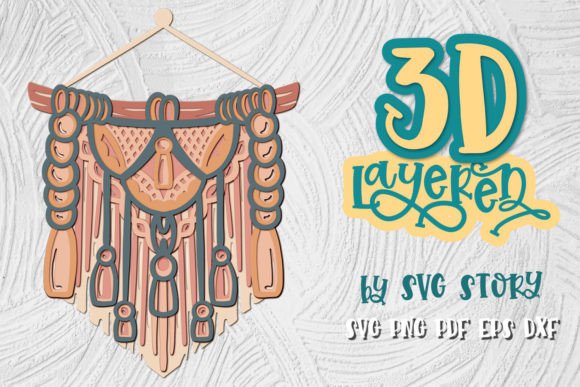
Unlike a single-line silhouette that can be cut in one go, a 3D layered macramé design consists of multiple distinct pieces that must be cut, weaved, and assembled to create depth. The "3D" effect is achieved not through magic, but through precise layering. When you purchase a 3D Layered Macrame Design SVG, you are essentially buying a blueprint for a complex assembly project disguised as a simple graphic.
One of the most frequent misunderstandings is assuming that the file is ready to print and cut immediately. In reality, these files require careful preparation. The layers often overlap in specific ways to create shadows and dimension. If you do not separate the layers correctly or if you misinterpret the intended order of assembly, the final piece may look flat, messy, or structurally unsound. It is vital to recognize that this is not just a cutting task; it is a construction task.
Common Mistakes in File Selection and Preparation
To avoid disappointment, you must scrutinize the files before you begin. Here are several critical areas where many users stumble.
Ignoring File Formats and Compatibility
Not all cutting software handles complex SVG structures equally well. Some older versions of design software may struggle with grouped elements or nested groups found in high-quality layered designs. Before purchasing or downloading, ensure your software supports the latest SVG standards. Furthermore, while many files come in multiple formats (SVG, EPS, DXF, PNG, PDF), choosing the wrong format for your machine can lead to errors. For instance, using a raster PNG file for detailed vector cuts will result in jagged edges and loss of precision. Always prioritize vector formats like SVG or EPS for cutting machines.
Overlooking Material Thickness and Stiffness
A major error in evaluating a 3D Layered Macrame Design SVG is ignoring how different materials behave. Macramé traditionally uses cord, which is flexible. However, digital cut files are often designed for cardstock, vinyl, or felt. These materials have varying degrees of stiffness. If you attempt to weave thick chipboard layers together as if they were soft paper, the joints will not hold, and the structure may collapse. Conversely, using overly thin material for large structural layers can cause sagging. The key is to match the material weight to the scale of the design. Smaller, intricate knots require thinner, more pliable materials, while larger geometric shapes can support stiffer cardstocks.
Misjudging Scale and Proportion
Another overlooked detail is scaling. Many users resize their designs arbitrarily without considering the minimum size requirements for intricate details. If you shrink a complex layered macramé design too much, the narrow strands used for weaving may become too fragile to cut cleanly or too difficult to handle during assembly. This leads to torn edges and broken pieces, ruining the illusion of delicate knotwork. Always test your design at its intended size on scrap material first to ensure the smallest elements remain intact.
Technical Execution: Cutting and Assembly Errors
Once you have the correct files and materials, the execution phase introduces its own set of challenges. The quality of your cut directly impacts the ease of assembly and the final aesthetic.
- Inadequate Blade Pressure: Because layered designs often involve multiple passes or intricate internal cuts, insufficient blade pressure can result in incomplete cuts. This forces you to manually tear apart pieces, damaging the edges and compromising the clean lines essential for a professional look.
- Poor Weaving Technique: The "macramé" aspect relies on interlocking layers. A common mistake is forcing layers together rather than gently threading them. This can warp the material or cause visible creases. Patience is required here; take the time to align each layer perfectly before securing it.
- Neglecting Adhesive Choice: Using the wrong glue can be disastrous. Standard white glue may soak into porous materials like cardstock, causing warping and visible bubbles. Hot glue, while strong, can leave bulky blobs that disrupt the smooth flow of the design. Consider using double-sided tape for invisible bonds or a fine-tip PVA glue applied sparingly for seamless integration.
How to Ensure Success with Your Project
By anticipating these potential issues, you can significantly improve your outcomes. Here are some actionable steps to refine your process.
Pre-Cut Inspection: After cutting, inspect every layer for cleanliness. Use a sharp pair of scissors or a precision knife to remove any tiny uncut bits. A single missed connection point can ruin the entire layered effect. Take your time here; rushing this step is a false economy.
Dry Assembly: Before applying any adhesive, lay out all the layers in the correct order. Visualize how they will stack. This "dry fit" allows you to identify any sizing discrepancies or alignment issues early. If a layer seems too wide or narrow, you can trim it slightly before committing to glue.
Utilize All Available Formats: As mentioned in the product details, these files often include SVG, EPS, DXF, PNG, and PDF formats. Do not limit yourself to just one. If you encounter issues with the SVG in your primary software, try importing the EPS or DXF version. Different software engines interpret vector data differently, and switching formats can sometimes resolve rendering glitches or grouping errors.
Final Thoughts on Value and Quality
When evaluating a 3D Layered Macrame Design SVG, remember that value is not just about the price tag. It is about the clarity of the instructions, the quality of the vector paths, and the versatility of the included formats. Reputable sellers, such as SVGStory, provide original, hand-drawn designs that have been optimized for smooth cutting. This attention to detail saves you time and reduces the likelihood of mechanical errors.
Moreover, always check the compatibility with your specific cutting machine. While most modern machines support these formats, verifying your software’s capabilities beforehand prevents unnecessary troubleshooting. If you require special formats for a specific industrial printer or specialized equipment, do not hesitate to contact the seller. Custom requests can often be accommodated, ensuring you get exactly what you need for your unique workflow.
Ultimately, creating 3D layered macramé art is a rewarding blend of digital precision and manual craftsmanship. By avoiding common pitfalls related to file selection, material choice, and assembly technique, you can produce stunning, professional-grade decorations that truly capture the essence of the trend. Approach the project with patience, prepare your materials carefully, and respect the complexity of the design. The result will be a beautiful, dimensional piece that stands out in any setting.