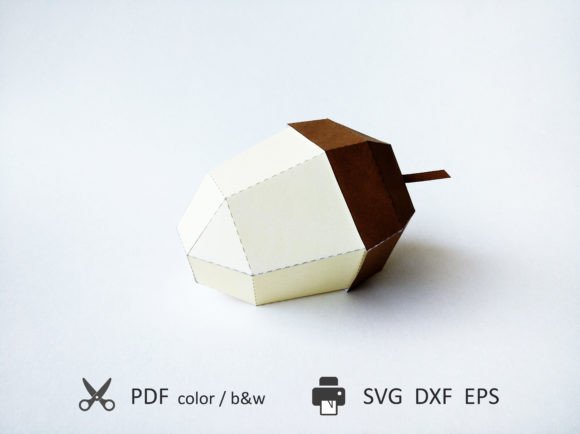
Mastering the Art of Paper Engineering: A Deep Dive into the Acorn 3D SVG Gift Box
In an era where digital craftsmanship meets tangible creativity, the Acorn 3D SVG Gift Box stands out as a versatile tool for both hobbyists and professional designers. This isn't just another paper toy; it is a meticulously engineered template designed to bridge the gap between simple hand-cutting and advanced machine fabrication. Whether you are looking to create a unique packaging solution for a small gift or exploring the nuances of vector-based papercraft, understanding how to leverage these files can transform your creative workflow.
The core appeal of this product lies in its dual nature. It offers immediate accessibility through standard PDF formats while providing high-precision utility via SVG, DXF, and EPS files. This flexibility ensures that whether you have a Silhouette Cameo, a Cricut Maker, or simply a pair of sharp scissors and a glue stick, you can achieve professional-grade results. The resulting assembled toy measures approximately 3.7 x 3.4 x 5.9 inches (95 x 86 x 150 mm), making it a substantial yet manageable structure that fits perfectly in the palm of your hand or on a modest desk shelf.
Understanding File Formats and Workflow Integration
One of the most critical aspects of working with digital papercraft templates is selecting the right file format for your specific tools. The Acorn 3D SVG Gift Box package is structured to accommodate different levels of technical proficiency and equipment availability. When you download and extract the ZIP file, you will find distinct folders containing resources tailored to your method of construction.
For those who prefer the tactile experience of traditional crafting, the PDF option is ideal. Designed for Letter A4 paper size, these files feature black and white contours that are easy to print and cut by hand. This method is particularly beneficial for beginners or for projects where color variations in the final product are desired through manual painting or coloring after assembly. The clarity of the contour lines in the PDF version ensures that even intricate details remain visible during the cutting process, reducing the risk of misalignment.
However, the true power of the Acorn 3D SVG Gift Box emerges when utilized with electronic cutting machines. The inclusion of SVG, DXF, and EPS files allows for precision cutting that eliminates the tediousness of manual tracing. These vector formats maintain their integrity regardless of scaling, ensuring that every curve and angle remains crisp. Furthermore, the files are organized into logical layers, which streamlines the design process significantly.
Optimizing for Cutting Machines
If you are using a cutting machine like a Cricut or Silhouette, the layered structure of the Acorn 3D SVG Gift Box files becomes indispensable. Elements of different colors or materials are placed in separate layers, allowing you to manage complex multi-material projects with ease. For instance, if you wish to use a contrasting ribbon or a metallic foil for specific accents, you can isolate those elements in their respective layers without affecting the rest of the box structure.
A crucial feature for achieving clean folds is the availability of two types of machine-cut files: those with scoring tools and those without. If your machine is equipped with a scoring wheel, you can utilize the files that include fold lines in a separate layer. In your cutting software, you must mark these specific lines as "Score" rather than "Cut." This distinction is vital because it instructs the machine to apply pressure without cutting through the material, creating a crisp crease that facilitates neat folding. You should then attach these score lines with other lines of the figure to cut in a single pass if your software supports batch processing, saving time and reducing material waste.
Conversely, if you do not have a scoring tool, the perforated fold lines provided in the alternative set of files serve as a practical workaround. While they require a bit more care during the folding process—often benefiting from a bone folder or a blunt edge to flatten the perforations—they still offer a reliable guide for assembly. Choosing between scored and perforated lines often comes down to the desired finish and the capabilities of your hardware.
Scaling and Proportionality in Design
While the default dimensions of the Acorn 3D SVG Gift Box are optimized for standard letter-sized paper, there may be occasions where you need a larger or smaller version. The templates are designed with proportionality in mind, ensuring that the aesthetic balance of the car-like structure remains intact regardless of scale. This is particularly important if you intend to display multiple models from the series together, as consistent sizing creates a cohesive visual narrative.
To increase the size, you can scale the template within your cutting software. By scaling up to Tabloid or A3 paper sizes, you can produce a model that is 1.5 times larger than the original. This expansion is seamless due to the vector nature of the SVG and DXF files. However, keep in mind that as you increase the scale, the complexity of assembly also grows. Larger pieces may require additional support structures or stronger adhesives to maintain their shape over time. Additionally, ensure that your cutting bed can accommodate the increased dimensions before proceeding with large-scale prints.
Practical Considerations for Assembly
Building the Acorn 3D SVG Gift Box is a rewarding process that rewards patience and attention to detail. Before beginning, it is advisable to review the info file located in the root folder of the downloaded ZIP archive. This document provides step-by-step instructions that clarify the sequence of folding and gluing, which can be tricky with three-dimensional structures. Missteps in the early stages can lead to alignment issues later on, so taking the time to understand the diagrammatic guides is essential.
When it comes to materials, the choice of paper or cardstock plays a significant role in the final outcome. For hand-cut versions, standard printer paper works well for prototyping, but heavier cardstock will result in a more durable and rigid final product. For machine-cut versions, consider the thickness of your material relative to the kerf of your blade. Thicker materials may require adjustments in your cutting software to account for the space removed by the blade, ensuring that tabs fit snugly into slots without being too loose or too tight.
Why Choose Digital Papercraft?
The shift towards digital templates like the Acorn 3D SVG Gift Box reflects a broader trend in modern hobbies and industries. Digital files offer reproducibility, consistency, and the ability to share designs globally. Unlike physical kits, which can be expensive to ship and store, digital downloads provide instant access to high-quality designs. Moreover, the ability to edit and customize these files allows users to put their own spin on the project, changing colors, adding logos, or modifying structural elements to suit specific branding needs.
Furthermore, this approach aligns with sustainable practices. By printing only what you need and choosing recyclable materials, you minimize waste. The precision of machine cutting also reduces errors, meaning fewer ruined attempts and less discarded material. For educators and workshop leaders, digital templates offer the advantage of easy distribution to participants, allowing for scalable group activities without the logistical burden of shipping physical kits.
Final Thoughts on Creative Potential
The Acorn 3D SVG Gift Box is more than just a static object; it is an invitation to engage with the mechanics of design and construction. Whether you are scaling it up for a grand display or keeping it at its original size for a personal keepsake, the process of bringing these flat vectors to life is inherently satisfying. The combination of user-friendly PDF options for beginners and robust vector files for experts ensures that everyone can find their niche in this craft.
As you experiment with different materials, colors, and scales, you will discover that the limitations of the template are merely starting points for innovation. The clear layering system, precise scoring options, and proportional design make the Acorn 3D SVG Gift Box a standout choice in the world of digital papercraft. Embrace the technology, respect the instructions, and let your creativity guide the assembly. The result is not just a box, but a testament to the blend of digital precision and handmade charm that defines modern creative expression.