Menorah 3D Shadow Box Paper Cut
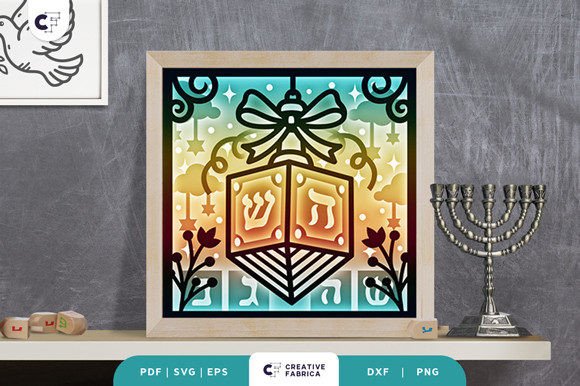
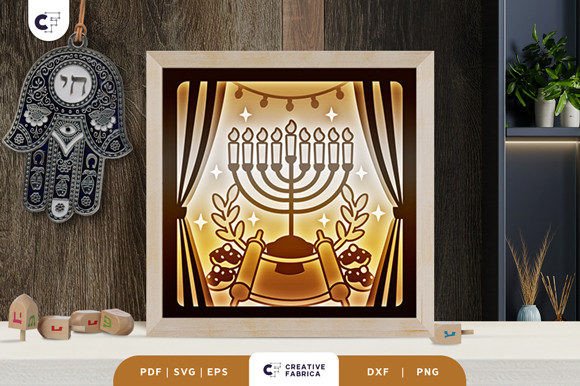
Hello, crafters. If you are looking to add a touch of cultural elegance and dimensional artistry to your home decor or gift-giving repertoire, the Menorah 3D Shadow Box Paper Cut is a project that demands attention. This is not merely a flat sticker or a simple card; it is a layered, square paper cutting template designed to create depth and visual interest. When assembled correctly, it transforms from a collection of cut shapes into a stunning piece of wall art that celebrates tradition through modern crafting techniques.
However, before you dive into your cutting machine or pick up an exacto knife, there are several practical considerations that can make the difference between a frustrated hobbyist and a proud creator. Many crafters underestimate the precision required for multi-layered projects. This guide will walk you through what this template offers, the common pitfalls to avoid, and how to ensure your final result looks professional and polished.
Understanding the Template Specifications
The core appeal of this design lies in its structural complexity. You are receiving a comprehensive digital package containing the template in multiple formats: SVG, PDF, EPS, PNG, and DXF. This versatility is crucial because it allows you to use various tools depending on your skill level and equipment availability.
- SVG Files: These are essential if you own a digital cutting machine like a Cricut or Silhouette. They allow for precise, automated cutting.
- PDF/EPS/PNG/DXF: These formats provide flexibility. If you do not have a cutting machine, you can print these files and cut by hand using an art knife and scissors.
The design consists of 9 distinct layers, which is significant. Each layer contributes to the overall shadow effect, creating a sense of depth as the eye moves from the background to the foreground. The final assembled size is 20.32×20.32 cm (approximately 8x8 inches). While SVG files can be resized, it is imperative that you maintain the same aspect ratio. Distorting the proportions will ruin the alignment of the layers, leading to a misshapen final product that lacks the intended aesthetic balance.
Common Mistakes in Assembly and Material Selection
One of the most frequent errors crafters make when working with 3D shadow boxes is underestimating the importance of paper weight and adhesive choice. The template notes that the featured cardstock is Encore Cardstock 80 lb cover (216 gsm). This is not a suggestion; it is a recommendation based on structural integrity.
If you choose a paper that is too thin, the layers may curl, tear during assembly, or fail to hold their shape against gravity. Conversely, paper that is too thick might be difficult to cut cleanly or may require excessive pressure, damaging your blade or causing uneven cuts. Using standard printer paper (typically around 75-90 gsm) is a common mistake that results in a flimsy, low-quality appearance. Stick to heavy cardstock to ensure the shadow box stands rigid and looks premium.
Another overlooked detail is the adhesive method. While glue works, it can warp paper if applied excessively. Double-sided tape is often preferred for layered projects because it provides consistent adhesion without introducing moisture that causes buckling. Ensure you have high-quality mounting foam squares or thin double-sided tape ready. These spacers also contribute to the "3D" aspect by physically separating the layers, enhancing the shadow effect.
Technical Preparation and Machine Settings
For those utilizing cutting machines, the file format compatibility is generally seamless, but machine settings vary. A common misunderstanding is assuming that default settings will work perfectly for intricate designs. The Menorah design features delicate branches and candles that require clean cuts. If your blade is dull or your mat is no longer sticky, you risk jagged edges or pieces falling out during the cutting process.
Before committing to your final cardstock, always run a test cut on scrap material of the same thickness. Check for:
- Cleanliness of lines: Are the curves smooth?
- Ease of removal: Do the pieces pop out easily, or do they require prying? Prying can damage fine details.
- Registration: If you are printing and then cutting (for PDFs), ensure your printer margins are accurate so the image aligns with the cut line.
Furthermore, remember that the SVG file included is vector-based. This means you can scale it up or down digitally before sending it to the cutter. However, never stretch the width and height independently. Always lock the aspect ratio. If you need a larger display, scale uniformly. If you attempt to force a non-square rectangle from a square source file, the Menorah will look distorted, defeating the purpose of the symmetrical design.
Creative Applications and Display Ideas
Once you have successfully assembled the 9 layers, you have more than just a static decoration. The neutral background and elegant silhouette of the Menorah make it incredibly versatile. Here are two effective ways to utilize this template beyond standard framing:
1. Framed Wall Decoration
This is the classic approach. Assemble the layers on a solid backing board and place them in a deep-frame shadow box frame. This protects the artwork from dust and physical contact. Choose a dark-colored backing paper to enhance the contrast of the lighter cardstock layers, making the shadows deeper and more dramatic.
2. Illuminated Light Box
For a special effect, consider integrating LED strips between the layers. By placing warm-white LEDs behind the base layers, the light filters through the subsequent layers, creating a glowing, ethereal effect. This is particularly poignant for Hanukkah or other Jewish holidays. It transforms the paper cut from a daytime decoration into a captivating night-time centerpiece. Just ensure you leave enough space between layers for the LED strip and that the battery pack or power source is discreetly hidden within the frame.
Purchasing Considerations and Final Checks
When acquiring this template, keep in mind that the images provided are for preview purposes only. The actual color of your finished product may vary slightly due to lighting conditions and the specific brand of cardstock you purchase. Digital screens also render colors differently than physical ink on paper. Therefore, do not rely solely on the thumbnail image to judge the final tone; instead, focus on the structural clarity of the design.
Additionally, be aware that some resources associated with such templates may include affiliate links. For instance, recommendations for specific cardstock shops (like the 12×12 Cardstock Shop mentioned in the source material) are often paid partnerships at no extra cost to you. This is a standard practice in the crafting community and helps creators sustain their work. It does not inherently bias the quality of the template itself, but it is good to know the context of where you are sourcing your materials.
Conclusion
The Menorah 3D Shadow Box Paper Cut is a rewarding project that bridges traditional symbolism with contemporary crafting. By selecting the right paper weight, maintaining proper aspect ratios during resizing, and using appropriate adhesives, you can avoid the common frustrations associated with layered paper art. Whether you are a beginner eager to try your first multi-layered project or an experienced crafter looking for a meaningful gift, this template offers a beautiful canvas for creativity. Take your time with the assembly, respect the precision of the layers, and you will be rewarded with a lasting piece of art.